DOLA AI: The Mobile AI Assistant Turning Prompts into Images, Videos and Everyday Content
What Is DOLA AI?
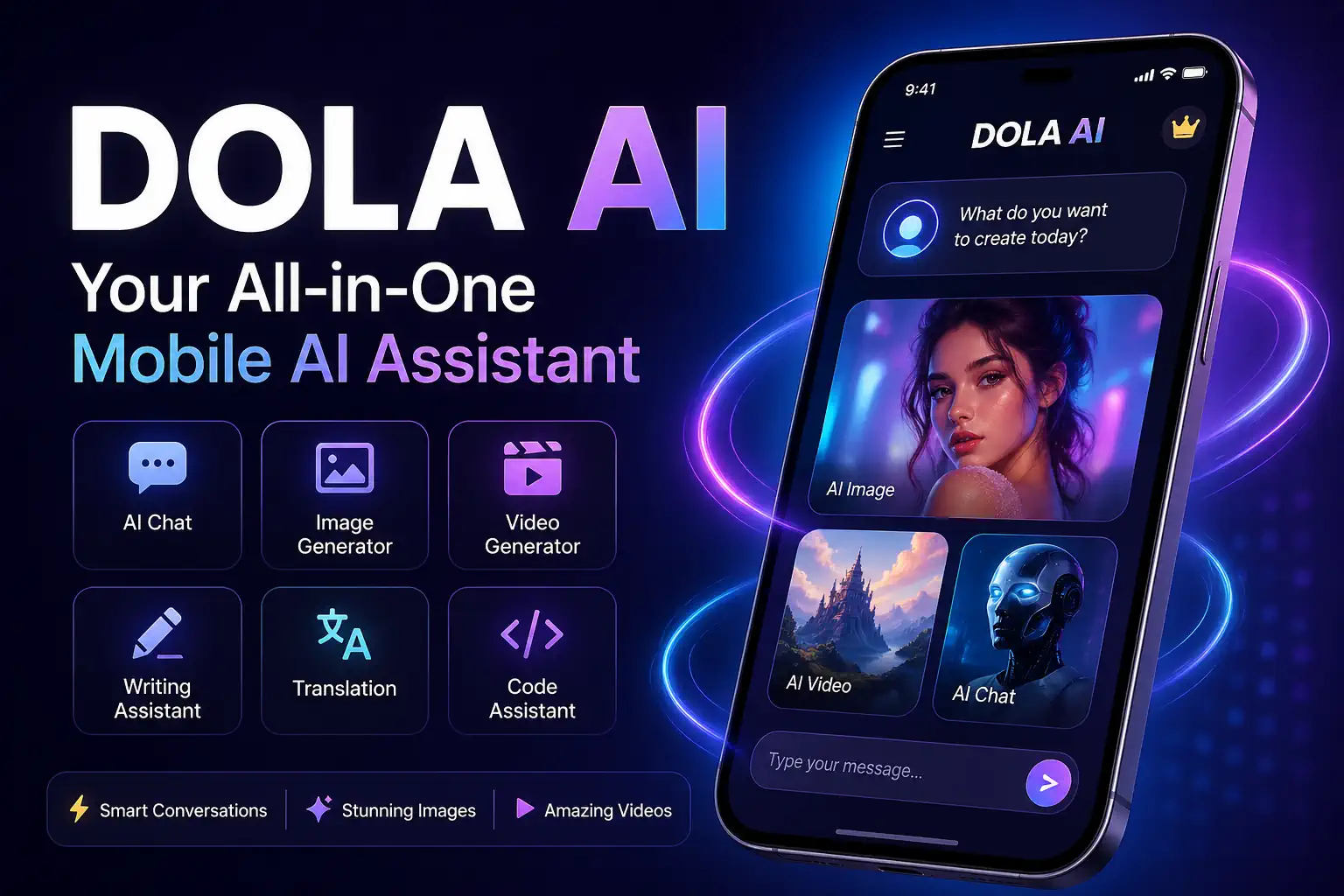
DOLA AI is best understood as a mobile AI assistant for everyday creativity and productivity. Instead of using separate tools for writing captions, generating images, creating visual concepts or animating photos, DOLA AI aims to bring several AI functions into one app-style experience.
For casual users, that means typing a prompt and receiving an answer, image or creative result quickly. For content creators, it can become a fast idea machine for TikTok, Instagram Reels, Facebook posts, ad creatives, fashion concepts, thumbnails and short-form video ideas.
The tool fits into a wider trend: AI apps are moving away from purely technical interfaces and becoming more visual, more mobile-friendly and more template-driven. That makes them attractive to creators who want results fast rather than spending hours learning professional design or video software.
Main Features of DOLA AI
1. AI Chat and Writing Assistance
DOLA AI can be used as a chat assistant for answering questions, brainstorming ideas, drafting text, improving messages, translating content and helping with basic programming tasks. This makes it useful beyond image generation, especially for students, creators, small businesses and social media managers.
2. Text-to-Image Generation
One of the most popular uses of DOLA AI is image generation. Users can type a detailed prompt and ask the app to create a visual result. This is especially useful for fashion concepts, profile pictures, fantasy portraits, marketing visuals, product-style shots, social media posts and creative experiments.
For best results, prompts should include the subject, outfit, pose, background, lighting, style, camera angle and image quality. A weak prompt such as “beautiful woman in red dress” may produce a generic image. A stronger prompt gives the AI a clear creative direction.
3. Photo-to-Video and AI Video Creation
Some DOLA-branded app listings promote AI video generation from text and photos. This is part of a major shift in generative AI: users no longer want only static images; they want motion, animation and short videos that can be posted directly to social platforms.
For creators, photo-to-video tools can help animate portraits, turn fashion photos into reels, create cinematic transitions or bring product images to life. This makes DOLA AI relevant for users producing TikTok, Instagram Reels, YouTube Shorts and Facebook video content.
4. Image Editing and Creative Styling
DOLA AI also appeals to users who want to change the look of an image without needing Photoshop-level skills. Typical use cases include changing an outfit, generating a new background, creating a fantasy style, turning a person into a cartoon, or producing a more polished editorial look.
Why DOLA AI Is Becoming Popular
DOLA AI’s appeal is simple: it reduces the distance between an idea and a finished piece of content. A user can start with a few words and end with an image, caption, concept or video idea. This speed is particularly valuable in the modern creator economy, where trends move quickly and visual content performs strongly.
The app-style format is also important. Many people do not want to open complex desktop tools, adjust technical settings or learn a professional workflow. They want a mobile experience: write prompt, generate result, refine, download or share.
This is why DOLA AI is especially attractive for:
- Social media creators
- Fashion and beauty content pages
- Small business owners
- Students and casual users
- Prompt writers and AI art communities
- Marketers creating quick visual concepts
- People experimenting with AI portraits and video reels
Example DOLA AI Prompt for Fashion Images
Here is a strong example of a DOLA AI fashion-style image prompt:
Ultra-realistic studio photography of a confident female model wearing an elegant red lace bodysuit with detailed floral texture, soft translucent fabric accents, metallic bracelets and a modern choker necklace. Dramatic red and pink studio background, strong side lighting, sharp shadow on the wall, high-fashion editorial pose, cinematic contrast, polished skin texture, professional camera quality, luxury magazine style, no text, no logo, no watermark.
This prompt works because it gives the AI a complete creative direction. It describes the subject, clothing, accessories, lighting, background, mood, camera style and restrictions.
How to Write Better Prompts for DOLA AI
The quality of the final result depends heavily on the quality of the prompt. A good DOLA AI prompt should be specific without becoming confusing.
Use this simple structure:
- Subject: Who or what is in the image?
- Action or pose: What is the subject doing?
- Clothing or object details: What should appear clearly?
- Background: Where is the scene set?
- Lighting: Soft, cinematic, dramatic, natural or studio?
- Style: Realistic, cartoon, editorial, luxury, futuristic or anime?
- Quality terms: High detail, sharp focus, professional photography.
- Negative instructions: No watermark, no text, no extra limbs, no distorted face.
The more controlled the prompt is, the easier it becomes to guide the AI towards the result you want.
DOLA AI for Social Media Creators
Social media is one of the strongest use cases for DOLA AI. A creator can generate image concepts, caption ideas, short video prompts, fashion visuals, storyboards and ad-style graphics from one mobile tool.
For TikTok and Instagram Reels, DOLA AI can be used at the early creative stage. For example, a creator can generate a striking fashion image, then use a video tool to animate it with camera movement, transitions, zoom effects or music. This workflow is becoming common among AI content creators who want to produce eye-catching reels quickly.
For small businesses, DOLA AI can help create visual mock-ups before hiring a designer or photographer. A boutique, salon, restaurant or interior design brand can test ad concepts, seasonal visuals and promotional ideas using AI before investing in a full campaign.
Strengths of DOLA AI
- Beginner-friendly: It is designed for users who want quick results.
- Mobile-first: Useful for creators working directly from a phone.
- Multi-purpose: Can support writing, images, ideas and video-style creativity.
- Fast experimentation: Users can test many prompt variations quickly.
- Useful for social content: Strong potential for reels, posts, thumbnails and ad ideas.
Limitations to Keep in Mind
Like any AI image or video tool, DOLA AI is not perfect. Results can vary depending on the prompt, the model version, the uploaded reference image and the complexity of the request.
Users should watch for common AI issues such as distorted hands, unnatural faces, inconsistent clothing details, strange shadows, unrealistic body proportions or unwanted background elements. When using AI for professional content, it is always worth checking the final image carefully before publishing.
Another important point is brand and copyright safety. Users should avoid asking AI tools to copy protected characters, celebrity likenesses, brand logos or copyrighted artwork without permission. For commercial projects, original prompts and original visual direction are safer.
Is DOLA AI Good for Businesses?
DOLA AI can be useful for businesses at the concept and content-creation stage. It can help generate campaign ideas, quick social visuals, product-style mock-ups, captions, promotional text and creative directions.
However, businesses should not treat AI output as automatically ready for publication. A human editor should check accuracy, brand fit, visual quality and legal safety. AI can accelerate the workflow, but it should not replace proper review.
For small businesses with limited budgets, DOLA AI may be valuable as a brainstorming and draft-generation tool. It can help them move faster, test more ideas and create content more frequently.
DOLA AI vs Traditional Creative Software
DOLA AI is not a full replacement for professional tools such as Photoshop, Premiere Pro, After Effects or Canva. Instead, it works best as a fast creative generator. Traditional tools still offer more control, precision and brand consistency.
A practical workflow is to use DOLA AI for ideation and generation, then refine the final content in a design or editing tool. For example, a user might generate an image in DOLA AI, resize it in Canva, add brand colours, insert text and export it for social media.
Best Use Cases for DOLA AI
- Creating AI fashion images
- Generating social media post ideas
- Making profile picture concepts
- Producing photo-to-video reel ideas
- Writing captions and short descriptions
- Creating visual mock-ups for ads
- Testing creative styles before a photoshoot
- Building prompt examples for AI content websites
Final Verdict: Is DOLA AI Worth Trying?
DOLA AI is worth trying if you want a simple, mobile-friendly way to experiment with AI writing, images and creative content. Its biggest strength is accessibility. It gives everyday users a quick route from idea to visual output without demanding technical skills.
For serious creators, DOLA AI can become part of a wider workflow: generate ideas in DOLA, polish them in Canva, animate them in a video editor and publish them across social platforms. For businesses, it can help speed up concept development and content planning.
The key is to use it intelligently. Strong prompts, careful editing and responsible publishing will always produce better results than relying on one-click generation alone.
Frequently Asked Questions About DOLA AI
What is DOLA AI?
DOLA AI is an AI assistant and creative app that can help with writing, image generation, conversation, translation, ideas and, in some versions, AI video creation.
Can DOLA AI generate images?
Yes. DOLA AI is commonly used for text-to-image generation, allowing users to create visuals from written prompts.
Can DOLA AI create videos?
Some DOLA-branded app listings promote AI video generation and photo-to-video features. Availability may depend on the specific app version and platform.
Is DOLA AI good for TikTok and Instagram Reels?
Yes, it can be useful for creating visual concepts, AI portraits, fashion images, video prompts and short-form content ideas for TikTok, Instagram Reels and YouTube Shorts.
Do I need prompt-writing experience?
No, but better prompts usually produce better results. Clear details about subject, style, lighting, background and quality will improve the output.
Can businesses use DOLA AI?
Yes, businesses can use it for brainstorming, social content, ad concepts and creative drafts. However, all AI-generated content should be reviewed before publication.

Published by
AgizoAI Editorial Team
AI news, prompt engineering, tool reviews and practical technology coverage from the AgizoAI editorial desk.
Continue reading
Related AI stories

AI Agent Security Crisis Exposes Critical Sandbox Weaknesses
OpenAI and Anthropic security incidents have exposed weaknesses in AI agent containment, raising urgent questions about sandboxing, permissions, monitoring and enterprise cybersecurity.
Big Tech Keeps Spending Heavily on AI Cloud Infrastructure: Why India Is the Next Battlefield
Amazon’s extra $13 billion India AI cloud investment shows why India is becoming the next major battlefield for AI infrastructure.
Anthropic’s Model-Release Fight Shows AI Is Becoming a National-Security Product
Anthropic’s Fable/Mythos model-release fight shows how frontier AI is becoming a national-security product shaped by export controls and cybersecurity risk.