
Free WordPress Plugin
AgizoAI HTML AI Clean Up – Free WordPress Plugin to Remove Hidden AI HTML
AgizoAI HTML AI Clean Up is a free WordPress plugin that helps editors, bloggers, publishers and website owners scan, preview and clean hidden or noisy HTML commonly introduced when copying content from AI tools, document editors, page builders and rich-text sources.
If you use AI-assisted writing tools and paste content into WordPress, this plugin gives you a safer way to detect hidden HTML, remove unwanted attributes and keep your articles clean before publishing.
What AgizoAI HTML AI Clean Up Does
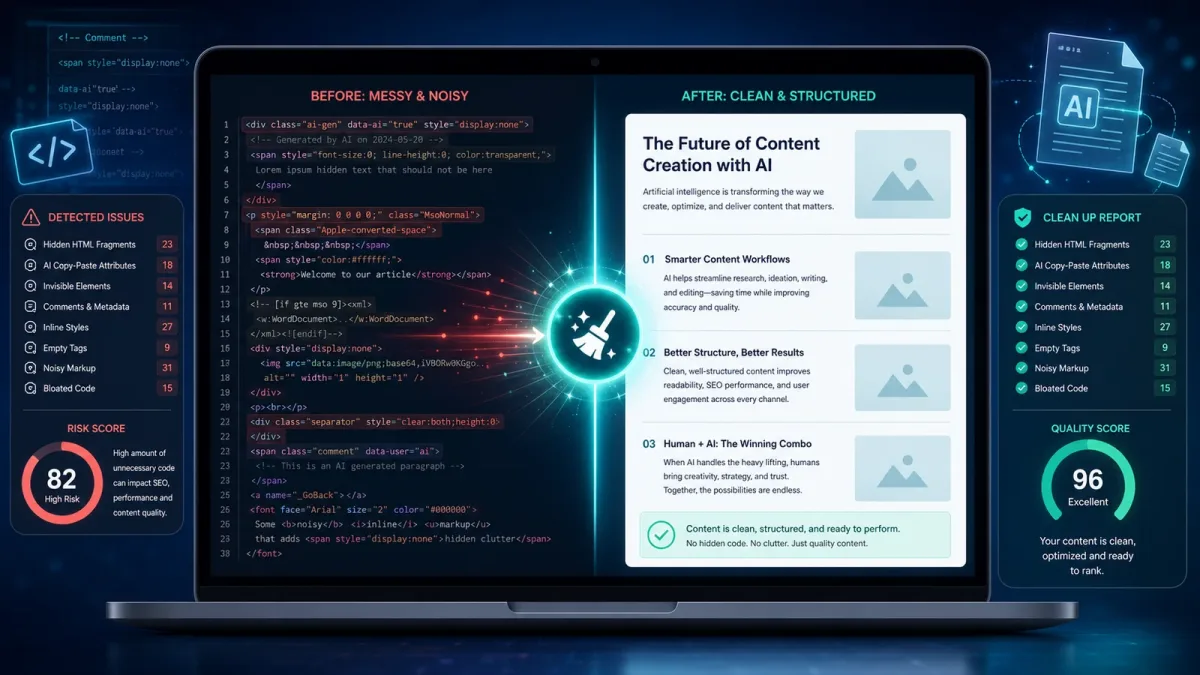
The plugin adds a dedicated HTML clean-up tool to the WordPress admin area. It can scan content, show an AI Paste Scan Report, calculate a risk score, preview what will be removed and apply clean-up rules manually.
It is designed for modern WordPress content workflows where editors often move text between AI tools, document editors, SEO tools, visual builders and the WordPress editor.
Main Features
AI Paste Scan Report
The plugin scans your content and reports hidden or noisy HTML elements, including data attributes, hidden comments, invisible elements, inline styles, SVG blocks, empty attributes, JavaScript event attributes and Microsoft Office fragments.
Risk Score
Each scan includes a simple risk level: Clean, Low, Medium or High. This helps editors quickly decide whether the content needs a safe, standard or aggressive clean-up.
Before and After Preview
Before applying changes, the plugin can preview what will be removed. This gives editors more control and reduces the risk of accidental formatting changes.
Safe, Standard, Aggressive and Custom Modes
AgizoAI HTML AI Clean Up includes different clean-up modes for different workflows. You can use presets for AI tool paste, Google Docs paste, Microsoft Word paste, page builder content or strict article clean-up.
Clean Selected Block
In the block editor, the plugin can clean selected content instead of cleaning the full post. This is useful when only one paragraph, section or copied block contains unwanted HTML.
Protected Elements
Important content can be protected, including shortcodes, embeds, iframes, tables, images, alt text, figures, captions, WordPress block comments and JSON-LD schema scripts.
Editor Quality Tools
The plugin also checks for HTML quality issues such as missing image alt text, empty links, weak link text, skipped heading levels, duplicate IDs, tables without header cells, long paragraphs and markdown artefacts left inside HTML.
Site-Wide HTML Scanner
The admin scanner can review recent posts, pages or public custom post types and show which content may contain hidden or noisy HTML. This helps site owners find problem content without automatically changing posts.
Revision-Safe Selected Post Clean-Up
For selected posts, the plugin can clean content with WordPress revision support where available. This gives website owners a safer way to clean multiple posts while keeping a backup trail.
Privacy-Friendly by Design
AgizoAI HTML AI Clean Up does not connect to OpenAI, ChatGPT, Claude, Gemini or any other AI provider. The plugin name refers to cleaning HTML often copied during AI-assisted content workflows, not to remote AI processing.
The plugin does not send post content to AgizoAI or to any third-party server. It does not track users, create cookies, collect analytics, use remote logging, inject adverts, add front-end popups or auto-enable browser notifications.
All clean-up actions are controlled by the editor or administrator. The plugin does not auto-publish content and does not cache private or logged-in pages.
Built for Clean WordPress Workflows
AgizoAI HTML AI Clean Up is built as a lightweight WordPress editor and admin tool. It uses a unique plugin prefix, sanitises settings, escapes admin output, uses nonces for admin actions and avoids unnecessary external services.
The plugin is focused on practical content hygiene: scan, preview, clean and review.
Who Should Use AgizoAI HTML AI Clean Up?
This plugin is useful for:
- WordPress bloggers using AI-assisted writing tools.
- Editors copying drafts from ChatGPT, Claude, Gemini or similar tools.
- Publishers pasting articles from Google Docs or Microsoft Word.
- Agencies managing content-heavy WordPress websites.
- SEO editors who want cleaner HTML before publishing.
- Developers who want a simple HTML clean-up workflow for clients.
- Website owners who want to reduce hidden code and messy pasted markup.
How It Works
- Install and activate the plugin from WordPress.org.
- Open the AgizoAI HTML AI Clean Up admin menu.
- Configure the clean-up settings for posts, pages or supported custom post types.
- Open a post or page in the WordPress editor.
- Run the AI Paste Scan Report.
- Review the risk score and recommended clean-up preset.
- Preview the cleaned HTML before applying changes.
- Apply the clean-up manually and review the final content before saving.
Download AgizoAI HTML AI Clean Up
AgizoAI HTML AI Clean Up is available as a free WordPress plugin from the official WordPress Plugin Directory.
Official WordPress.org plugin page:
Download AgizoAI HTML AI Clean Up from WordPress.org
You can also install it directly from your WordPress dashboard by going to
Plugins > Add New and searching for
AgizoAI HTML AI Clean Up.
Plugin Details
- Plugin name: AgizoAI HTML AI Clean Up
- Plugin slug: agizoai-html-ai-clean-up
- WordPress.org URL: https://wordpress.org/plugins/agizoai-html-ai-clean-up/
- Requires WordPress: 6.0 or higher
- Tested up to: WordPress 7.0
- Requires PHP: 8.1 or higher
- Licence: GPLv2 or later
Frequently Asked Questions
Does this plugin use an AI API?
No. AgizoAI HTML AI Clean Up does not use OpenAI, ChatGPT, Claude, Gemini or any other AI API. It cleans HTML inside the WordPress editing workflow.
Does the plugin send my post content to AgizoAI?
No. The plugin does not send post content, prompts, metadata, logs or analytics to AgizoAI or to any third-party service.
Can it remove hidden HTML copied from AI tools?
Yes. The plugin is designed to detect and remove hidden or noisy markup commonly carried over from AI writing tools, document editors, online editors and rich-text sources.
Will it automatically publish or modify my posts?
No. Editor clean-up is manual. Site-wide tools are controlled from the admin area, and selected post clean-up should be reviewed carefully before use.
Can it help with SEO-safe HTML?
Yes. The plugin includes checks for content structure issues such as H1 tags inside post content, unsafe links, long paragraphs, missing headings and markdown artefacts left inside HTML.
Is it suitable for client websites?
Yes. The plugin is lightweight, privacy-friendly and designed for practical editorial workflows.
Final Verdict
AgizoAI HTML AI Clean Up is a practical WordPress plugin for AI-assisted publishing workflows. It helps editors keep content cleaner, reduce hidden HTML, protect important elements and improve HTML quality before publishing.
For bloggers, publishers, agencies and SEO editors who regularly paste content into WordPress, this plugin adds a useful layer of content hygiene without external API calls, tracking or unnecessary complexity.
Download AgizoAI HTML AI Clean Up from the official WordPress Plugin Directory